Knowing how to calculate password entropy turns a vague feeling about security into a number you can compare. Entropy, measured in bits, tells you how many guesses an attacker would need on average to find a password chosen at random. With one short formula and a basic calculator, you can see why a 12-character random password beats an 8-character one by a huge margin, and why four random words can outperform a complicated but short string.
This guide covers the formula, the manual steps, worked examples, crack-time estimates and the mistakes that make entropy figures misleading. If you prefer to skip the arithmetic, you can run the numbers with the tools available at Calculatorr.
What is password entropy and why does it matter?
Password entropy measures unpredictability. Each bit of entropy doubles the number of possibilities an attacker must search. A password with 40 bits of entropy has about 1.1 trillion possible values. One with 41 bits has twice as many.
This matters because attackers do not guess by hand. They use software that tests billions of candidates per second against stolen password hashes. Entropy gives you a way to estimate how long that search would take and to decide whether a password is worth using.
What entropy does and does not measure
- It measures the size of the search space when the password is generated randomly.
- It does not measure how memorable a password is.
- It does not account for passwords people choose themselves, which follow predictable patterns.
- It does not protect you if the same password is reused on several sites.
Password entropy formula: the math behind the bits
The standard formula for a randomly generated password is:
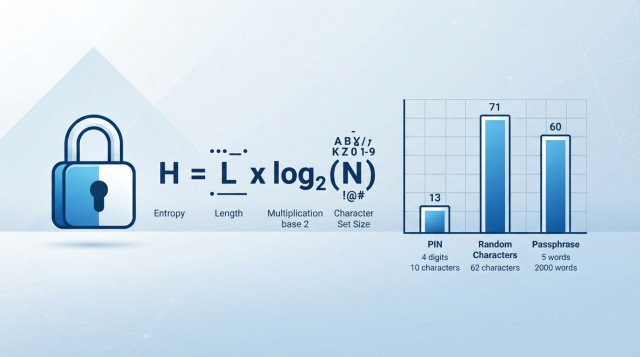
H = L × log2(N)
- H = entropy in bits
- L = length of the password (number of characters or words)
- N = size of the pool of possible symbols
An equivalent way to write it is H = log2(N^L). The total number of possible passwords is N^L, and entropy is simply the base-2 logarithm of that count.
Common character pool sizes
| Character set | Pool size (N) | Bits per character |
|---|---|---|
| Digits only (0-9) | 10 | 3.32 |
| Lowercase letters | 26 | 4.70 |
| Upper and lowercase letters | 52 | 5.70 |
| Letters and digits | 62 | 5.95 |
| Letters, digits and 32 common symbols | 94 | 6.55 |
| Diceware-style word list (7,776 words) | 7,776 | 12.92 per word |
How to calculate password entropy step by step
You can do this by hand with any calculator that has a logarithm function.
Step 1: Identify the pool size
Count how many different symbols the password could use. If it was generated from lowercase letters only, N = 26. If it mixes lowercase, uppercase and digits, N = 62.
Step 2: Count the length
Count the characters (or words, if you use a passphrase). This is L.
Step 3: Find log2(N)
If your calculator only has base-10 or natural logarithms, convert it: log2(N) = log10(N) / log10(2), or ln(N) / ln(2). For N = 62, log10(62) = 1.7924 and log10(2) = 0.3010, so log2(62) is about 5.954.
Step 4: Multiply by the length
Multiply L by log2(N). The result is the entropy in bits.
Password entropy examples with real numbers
Example 1: An 8-digit PIN
N = 10, L = 8. H = 8 × 3.3219 = 26.58 bits. There are 100,000,000 possible values, which is small by modern standards.
Example 2: 8 random lowercase letters
N = 26, L = 8. H = 8 × 4.7004 = 37.60 bits. That is about 208.8 billion combinations (26^8 = 208,827,064,576).
Example 3: 12 random characters from letters and digits
N = 62, L = 12. H = 12 × 5.9542 = 71.45 bits. The total space is roughly 3.23 × 10^21 combinations.
Example 4: 16 random characters from the full 94-symbol set
N = 94, L = 16. H = 16 × 6.5546 = 104.87 bits. This is far beyond any realistic brute-force attack.
Example 5: A five-word random passphrase
Each word is picked at random from a 7,776-word list, so each adds 12.925 bits. Five words give H = 5 × 12.925 = 64.62 bits. Six words give 77.55 bits. Passphrases reach strong entropy while staying easy to type and remember.
How long does it take to crack a password based on its entropy?
Once you know the bits, estimating crack time takes one more step. On average, an attacker finds the password after searching half the space, so:
Average guesses = 2^(H - 1)
Time = average guesses / guesses per second
The guess rate depends on how the password is stored and attacked. Online login forms with rate limits allow only a handful of attempts per second. An attacker with a stolen database protected by a fast hash and powerful hardware may reach billions per second. The table below assumes a deliberately pessimistic 10 billion guesses per second.
| Password type | Entropy | Average crack time at 10^10 guesses/s |
|---|---|---|
| 8-digit PIN | 26.6 bits | About 0.005 seconds |
| 8 random lowercase letters | 37.6 bits | About 10 seconds |
| 5-word passphrase | 64.6 bits | About 45 years |
| 12 random letters and digits | 71.5 bits | About 5,100 years |
| 16 random characters (94 symbols) | 104.9 bits | Tens of trillions of years |
Worked crack-time example
Take the 12-character letters-and-digits password. The space is about 3.23 × 10^21, so the average number of guesses is half of that, about 1.61 × 10^21. Divide by 10^10 guesses per second to get 1.61 × 10^11 seconds. One year has about 3.156 × 10^7 seconds, so the result is roughly 5,100 years.
How many bits of entropy is a strong password?
There is no single threshold, but these ranges are a practical guide for randomly generated passwords:
- Under 40 bits: weak. It can fall quickly to an offline attack.
- 40 to 60 bits: acceptable only where login attempts are strictly limited.
- 60 to 80 bits: strong for most personal accounts.
- 80 bits and above: very strong, suitable for password managers, encryption keys and sensitive accounts.
How long should the password be for a target entropy?
Rearrange the formula to get L = H / log2(N). To reach 80 bits:
- With 94 symbols: 80 / 6.5546 = 12.2, so use 13 characters.
- With 62 symbols: 80 / 5.9542 = 13.4, so use 14 characters.
- With lowercase only: 80 / 4.7004 = 17.0, so use 18 characters.
- With a 7,776-word list: 80 / 12.925 = 6.2, so use 7 words.
Always round up, since a fractional character does not exist. Notice that adding length usually helps more than adding symbol types.
Password entropy calculator: how to use one correctly
An online calculator automates the same formula. The process is simple:
- Select or enter the character pool size, or choose the character types your password uses.
- Enter the length.
- Read the entropy in bits and, if the tool offers it, the estimated crack time.
- Adjust the assumed guesses per second to match the threat you care about.
Because the calculation relies on logarithms and large powers, a calculator avoids slips that are easy to make by hand. You can also use the general-purpose tools at Calculatorr to check exponents, powers and logarithm conversions when working through the steps yourself.
Never type a real password into a website to test it. Use a similar made-up password with the same length and character types, or simply enter the length and pool size, which is all the formula needs.
Common mistakes when calculating password entropy
Applying the formula to human-chosen passwords
The formula assumes every character is picked independently and uniformly at random. A password like Summer2024! looks like it uses 94 symbols across 11 characters, which would suggest about 72 bits. In reality, attackers try dictionary words, common suffixes and predictable substitutions first. The true strength is much lower.
Counting character types you did not use at random
Adding a capital letter at the start and a digit at the end does not give you the full benefit of a 62-symbol pool. Those positions are highly predictable, so the real gain is only a few bits.
Using the wrong pool size
If a site only allows letters and digits, the pool is 62, not 94. If your generator excludes look-alike characters such as O and 0, the pool is slightly smaller than the standard figures.
Forgetting the average-case halving
Some sources quote the time to search the entire space, others the average time. The average is half the full search, which is one bit less. State which one you use when comparing results.
Ignoring reuse and storage
A 100-bit password is no help if it is reused on a site that leaks it in plain text. Entropy describes guessing resistance only, so unique passwords per account and a reputable password manager remain essential.
How to apply password entropy results in daily use
- For accounts you store in a password manager, generate random passwords of at least 16 characters, which gives roughly 100 bits with a full symbol set.
- For passwords you must memorize, such as a manager's master password, use a random passphrase of six or more words.
- For PINs, rely on lockout limits rather than entropy alone, since even 6 digits give only about 19.9 bits.
- Enable two-factor authentication so a single guessed password is not enough.
As a rule of thumb, each additional random character adds between 3.3 and 6.6 bits, while each additional random word adds nearly 13. Calculating the number takes less than a minute and gives you a clear basis for deciding whether a password is worth keeping or replacing.