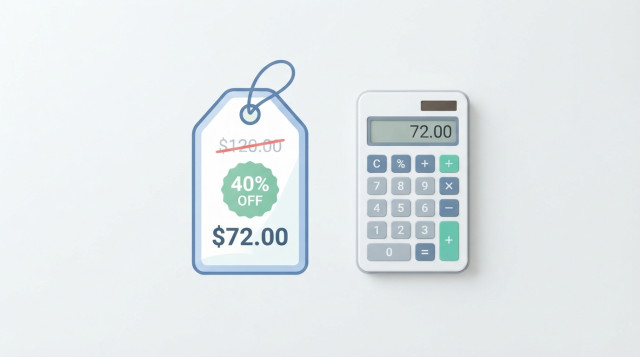
A discount calculator tells you exactly what you will pay after a price cut, how much money you keep, and whether a promotion is as good as it looks. The math is simple, but it is easy to get wrong once you add a second coupon, sales tax or a sale price you need to reverse-engineer. This guide shows the formulas, the manual steps and real examples so you can check any offer in seconds.
What a discount calculator does and when to use it
A discount calculator takes two numbers, the original price and the discount percentage, and returns the final price and the amount saved. Better versions also work backward: they find the original price from a sale price, or the percentage off from two prices.
You can use it when you are:
- Comparing sale prices in different stores.
- Checking a coupon code at checkout.
- Pricing your own products for a promotion.
- Budgeting for a large purchase during a seasonal sale.
- Working out the real value of stacked offers, such as a store sale plus a loyalty coupon.
Discount formulas: sale price, savings and percentage off
Every discount problem uses the same three quantities: the original price, the discount rate and the final price. Write the percentage as a decimal by dividing it by 100, so 30% becomes 0.30.
| What you want | Formula |
|---|---|
| Amount saved | Original price × discount rate |
| Sale price | Original price − amount saved |
| Sale price (shortcut) | Original price × (1 − discount rate) |
| Original price | Sale price ÷ (1 − discount rate) |
| Discount percentage | (Original price − sale price) ÷ original price × 100 |
The shortcut version is the one most calculators use, because it gives the final price in a single multiplication.
How to work out a discount step by step
Method 1: find the savings first
Take a jacket priced at $85 with 30% off.
- Convert the percentage: 30 ÷ 100 = 0.30.
- Multiply by the original price: 85 × 0.30 = $25.50 saved.
- Subtract the savings: 85 − 25.50 = $59.50.
Method 2: use the multiplier
Instead of two steps, subtract the discount rate from 1. With 30% off, you pay 70% of the price, so the multiplier is 0.70.
85 × 0.70 = $59.50. The result is identical, and you only type one calculation. This approach is also the key to handling stacked discounts correctly.
How to find the original price from a sale price
Sometimes you see only the final price and need to know what it was before the markdown. Divide the sale price by the multiplier, not by the discount rate.
Example: a pair of headphones costs $48 after 20% off.
- Multiplier: 1 − 0.20 = 0.80.
- Original price: 48 ÷ 0.80 = $60.
A common mistake is to calculate 20% of $48 and add it back, which gives $57.60. That is wrong because the 20% was taken from the higher original price, not from $48.
How to find the discount percentage between two prices
If you know the old and new price, the percentage off is the drop divided by the starting price.
Example: a monitor was $120 and is now $90.
- Price drop: 120 − 90 = $30.
- Divide by the original price: 30 ÷ 120 = 0.25.
- Convert to a percentage: 25% off.
This is useful for fixed-amount coupons too. A $20 coupon on a $120 order is 20 ÷ 120 = 16.67% off, which lets you compare it directly with a percentage offer.
Stacked discounts: why 20% plus 10% is not 30%
When two percentage discounts apply one after the other, the second one is taken from the already reduced price. That makes the total saving smaller than the simple sum.
Example: a $250 item with 20% off, followed by an extra 10% coupon.
- After the first discount: 250 × 0.80 = $200.
- After the second discount: 200 × 0.90 = $180.
You saved $70, which is 28% of the original price, not 30%. The combined multiplier is 0.80 × 0.90 = 0.72, so the total discount is 1 − 0.72 = 28%.
The order of percentage discounts does not change the final price, because multiplication gives the same result in any order. Here are some common combinations:
| Discount 1 | Discount 2 | Real total discount |
|---|---|---|
| 10% | 10% | 19% |
| 20% | 10% | 28% |
| 30% | 20% | 44% |
| 40% | 25% | 55% |
| 50% | 20% | 60% |
Percentage coupons versus fixed-amount coupons
When a percentage discount and a fixed coupon are combined, the order does matter. Take a $100 item with 20% off and a $10 coupon.
- Percentage first, then coupon: 100 × 0.80 = 80, minus 10 = $70.
- Coupon first, then percentage: (100 − 10) × 0.80 = $72.
Applying the percentage first gives you the better deal. Check the terms of the offer, since stores decide the order their systems use.
How to add sales tax or VAT after a discount
In most places, tax is calculated on the discounted price. Multiply the sale price by 1 plus the tax rate.
Example: a $200 appliance with 25% off and 8% sales tax.
- Sale price: 200 × 0.75 = $150.
- Price with tax: 150 × 1.08 = $162.
Some regions or coupon types apply tax to the pre-discount amount, so always compare your result with the receipt or checkout total the first time you use a new store.
How to use an online discount calculator
The tools on Calculatorr are built to give you the answer without manual steps. A typical workflow looks like this:
- Enter the original price, without currency symbols or commas.
- Enter the discount percentage, or the fixed coupon amount if that is what you have.
- Add a second discount if the offer is stacked.
- Enter the tax rate if you want the final amount at checkout.
- Read the sale price, the money saved and the total effective discount.
If you only know two prices, switch to the percentage-off mode. You can also explore other tools at calculatorr.com, such as the percentage change and percentage of a number calculators, which use the same logic.
How to read the result and judge whether it is a good deal
A big percentage does not always mean a low price. Use the result to ask a few practical questions:
- Is the final price lower than the usual price at other stores, not only the crossed-out price?
- Is the original price realistic, or was it inflated before the sale?
- Does the price per unit, weight or use beat a cheaper alternative?
- Would you buy the item at the full price? If not, a discount does not make it a need.
For example, a $60 item at 50% off costs $30, while a similar item that is never discounted costs $35. The sale item is cheaper, but only by $5, not by the 50% the label suggests. Compare final prices, not percentages.
Quick mental math for common discounts
You can estimate most discounts without a device.
- 10% off: move the decimal point one place to the left. 10% of $76 is $7.60.
- 20% off: find 10% and double it. 20% of $76 is $15.20.
- 25% off: divide by 4. 25% of $76 is $19.
- 15% off: add 10% and half of 10%. 15% of $76 is $7.60 + $3.80 = $11.40.
- 50% off: divide by 2.
Subtract the result from the original price and you have a quick estimate, which you can confirm with a calculator when the purchase is large.
Common mistakes when calculating discounts
- Adding stacked percentages. 30% plus 20% is 44% in practice, not 50%.
- Reversing a discount by adding the percentage to the sale price instead of dividing by the multiplier.
- Typing 0.30 into a field that already expects a percentage, which gives a 0.3% discount.
- Forgetting that tax, shipping or service fees are separate from the discounted price.
- Comparing a percentage coupon with a fixed coupon without converting both to the same basis.
- Rounding too early. Keep full decimals until the last step, then round the final price to two places.
Applying the formulas once or twice with your own numbers makes them automatic. For anything with several layers of offers, a discount calculator saves time and removes the guesswork before you pay.