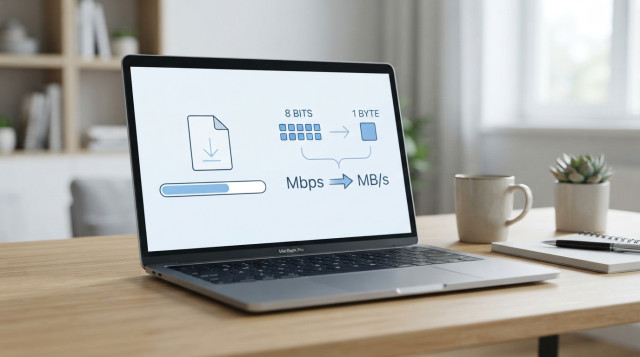
To calculate download time, divide the file size by your connection speed, making sure both use the same unit. The catch is that internet plans are sold in megabits per second (Mbps) while files are measured in megabytes (MB) or gigabytes (GB). Mixing the two is the most common reason estimates come out eight times too fast or too slow.
This guide shows the exact formula, the Mbps to MB/s conversion, realistic adjustments for overhead, and worked examples for downloads and uploads. You can check any result with the tools on Calculatorr.
How to calculate download time from file size and internet speed
Download time is the amount of data you need to move divided by the rate at which it moves. The idea is simple, but the units must match before you divide.
The basic download time formula
The core formula is:
Time (seconds) = File size (MB) × 8 ÷ Speed (Mbps)
The factor of 8 appears because one byte contains eight bits. File sizes use bytes, and connection speeds use bits, so the file size has to be converted to megabits first.
If you prefer to work in bytes, convert the speed instead:
Time (seconds) = File size (MB) ÷ Speed (MB/s)
where MB/s = Mbps ÷ 8.
Formula with a real-world efficiency factor
No connection delivers its full advertised speed all the time. Protocol overhead, Wi-Fi interference and server limits all reduce it. A more realistic formula is:
Time (seconds) = File size (MB) × 8 ÷ (Speed (Mbps) × Efficiency)
Efficiency is a decimal between 0 and 1. A wired connection often reaches 0.90 to 0.95. Wi-Fi in a busy home commonly lands between 0.70 and 0.85.
Mbps to MB/s: how to convert internet speed correctly
Mbps means megabits per second. MB/s means megabytes per second. Your browser, game launcher and file manager usually show MB/s, while your internet provider quotes Mbps.
The conversion is a division by 8:
- MB/s = Mbps ÷ 8
- Mbps = MB/s × 8
For example, a 200 Mbps plan peaks at 200 ÷ 8 = 25 MB/s. That is the fastest your downloads can run under ideal conditions, not the typical speed.
Quick conversion table
| Speed (Mbps) | Speed (MB/s) | Time for 1 GB (theoretical) |
|---|---|---|
| 10 | 1.25 | 13 min 20 s |
| 25 | 3.125 | 5 min 20 s |
| 50 | 6.25 | 2 min 40 s |
| 100 | 12.5 | 1 min 20 s |
| 300 | 37.5 | 26.7 s |
| 500 | 62.5 | 16 s |
| 1000 | 125 | 8 s |
These times use 1 GB = 1,000 MB, which is how most file sizes and storage products are labeled.

Download time formula step by step
Follow these steps every time and the result will be reliable.
- Write down the file size and its unit (MB or GB).
- Convert it to MB. Multiply GB by 1,000 (or by 1,024 if your system reports binary units).
- Write down your speed in Mbps from your plan or a speed test.
- Convert the speed to MB/s by dividing by 8.
- Apply an efficiency factor if you want a realistic estimate. Multiply MB/s by 0.85, for instance.
- Divide file size by speed to get seconds.
- Convert seconds to minutes and hours by dividing by 60 and 3,600.
Examples of calculating download time with real numbers
Example 1: a 25 GB file on a 500 Mbps connection
File size: 25 GB = 25,000 MB.
Speed: 500 ÷ 8 = 62.5 MB/s.
Ideal time: 25,000 ÷ 62.5 = 400 seconds, or 6 minutes 40 seconds.
With 85% efficiency, the effective speed is 62.5 × 0.85 = 53.125 MB/s. Time: 25,000 ÷ 53.125 ≈ 470.6 seconds, or about 7 minutes 51 seconds.
Example 2: a 700 MB file on a 50 Mbps connection
Speed: 50 ÷ 8 = 6.25 MB/s.
Ideal time: 700 ÷ 6.25 = 112 seconds, or 1 minute 52 seconds.
At 90% efficiency, speed is 5.625 MB/s and time is 700 ÷ 5.625 ≈ 124.4 seconds, about 2 minutes 4 seconds.
Example 3: a 100 GB game on a 200 Mbps connection
File size: 100 GB = 100,000 MB.
Speed: 200 ÷ 8 = 25 MB/s.
Ideal time: 100,000 ÷ 25 = 4,000 seconds, or 1 hour 6 minutes 40 seconds.
At 85% efficiency, speed is 21.25 MB/s. Time: 100,000 ÷ 21.25 ≈ 4,706 seconds, roughly 1 hour 18 minutes 26 seconds.
Example 4: uploading a 4 GB video on a 20 Mbps upload connection
Uploads use the upload speed of your plan, which is often much lower than the download speed.
File size: 4 GB = 4,000 MB. Upload speed: 20 ÷ 8 = 2.5 MB/s.
Ideal time: 4,000 ÷ 2.5 = 1,600 seconds, or 26 minutes 40 seconds.
At 90% efficiency: 4,000 ÷ 2.25 ≈ 1,778 seconds, about 29 minutes 38 seconds.
Download time calculator: how to use it with your own numbers
A download time calculator does the unit conversion and the division for you. Using one is a matter of entering three values.
- Enter the file size and choose the correct unit (KB, MB, GB or TB).
- Enter your connection speed and choose Mbps, or MB/s if that is what your downloader shows.
- Add an efficiency or overhead percentage if the tool offers it.
- Read the estimated time and compare it with your expectations.
If you want to double-check the unit side of the problem, the conversion tools on Calculatorr help with data sizes and rates, and you can follow the manual steps above to confirm the answer.
How to calculate the internet speed you need for a file
Sometimes the question runs in reverse: how fast must the connection be to finish a transfer in a set time? Rearrange the formula:
Required speed (Mbps) = File size (MB) × 8 ÷ (Time in seconds × Efficiency)
Suppose you need to download a 2 GB update in 10 minutes. File size is 2,000 MB and time is 600 seconds.
Without overhead: 2,000 × 8 ÷ 600 ≈ 26.7 Mbps.
With 85% efficiency: 26.7 ÷ 0.85 ≈ 31.4 Mbps.
So a plan of at least 35 to 40 Mbps gives you a comfortable margin.
Why this matters for streaming and video calls
The same logic applies to continuous data. If a video stream uses 15 Mbps, it moves 1.875 MB every second, or about 6.75 GB per hour. Knowing this helps you estimate data caps and how many devices a connection can support at once.
Why your real download speed is lower than the plan speed
If your result is faster than reality, one of these factors is probably responsible.
- Protocol overhead. Headers and error checking use a small share of the bandwidth, typically 5% to 10%.
- Wi-Fi quality. Distance, walls and crowded channels can cut speeds sharply compared with a cable connection.
- Shared bandwidth. Other devices streaming or syncing in the background reduce what is left for your download.
- Server limits. The source may throttle each user, so a 1 Gbps line does not guarantee 125 MB/s.
- Disk speed. A slow hard drive or a nearly full SSD can limit how fast data is written.
- Peak-hour congestion. Evening traffic on shared networks can lower speeds below the contracted rate.
Decimal vs binary units: GB, GiB and file size differences
Storage manufacturers and many download sites use decimal units, where 1 GB equals 1,000 MB. Some operating systems use binary units, where 1 GiB equals 1,024 MiB, and may still label them as GB.
The gap grows with size. A file of 25 GB (decimal) shows up as roughly 23.3 GiB in a binary system. If you calculate with the wrong convention, your estimate can be off by about 7% at gigabyte scale and about 10% at terabyte scale.
For a quick estimate, using 1 GB = 1,000 MB is fine. For precise planning of very large transfers, use the same convention as the system reporting the size.
Common mistakes when calculating download time
- Forgetting the factor of 8. Dividing GB by Mbps directly gives a result that is eight times too small.
- Mixing upload and download speeds. Sending files uses the upload rate, which is frequently much lower.
- Using the advertised speed as the real speed. Run a speed test on the device that will do the download and use that number.
- Ignoring unit prefixes. A kilobit is not a kilobyte, and a megabit is not a megabyte. Lowercase b means bits and uppercase B means bytes.
- Skipping the conversion to minutes. Results in seconds are easy to misread. Divide by 60 for minutes and by 3,600 for hours.
- Not allowing for a margin. Plan for 10% to 25% more time than the ideal result.

How to read and use your download time result
Treat the ideal result as the best case and the efficiency-adjusted result as the number to plan around. If a large update is estimated at 47 minutes ideally and 55 minutes realistically, schedule it for the longer figure.
If the result is far longer than you expected, check three things in order: the unit of your speed, whether you used download or upload speed, and whether a speed test on your device matches your plan. Often the fix is moving closer to the router or switching to a cable.
For repeated tasks, such as backing up photos every week, calculate the time once, note the average speed that your connection really delivers, and reuse it. More tools for conversions, percentages and everyday estimates are available at Calculatorr.