how to calculate training load (TRIMP and TSS)
Training load measures how much stress a workout places on your body. Calculating training load helps athletes, coaches and recreational exercisers plan progressions, avoid overtraining and monitor recovery. This guide explains two widely used methods—Banister's TRIMP and Training Stress Score (TSS)—with formulas, step-by-step calculations, examples and tips to use an online calculator.
what is TRIMP and when to use it
TRIMP (TRaining IMPulse) is a physiological load metric developed to quantify the internal stress of a session by combining exercise duration and intensity. Use TRIMP when you have heart rate data and want a simple, physiologically informed load value to compare sessions over time.
TRIMP basic formula (Banister)
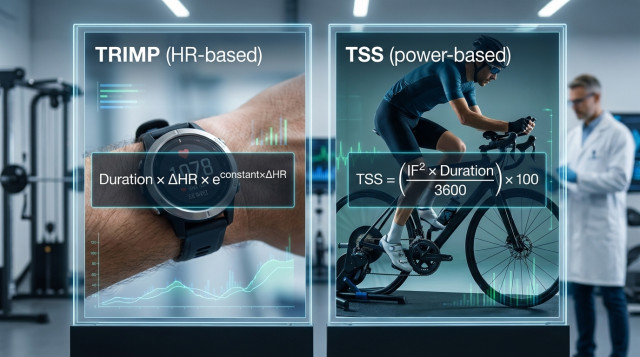
The classical Banister TRIMP formula is:
TRIMP = Duration (min) × ΔHR × Y
Where:
- Duration (min) = total minutes of exercise
- ΔHR = (HRsession - HRrest) / (HRmax - HRrest) (fractional heart rate intensity)
- Y = sex-specific weighting factor: for men Y = e^(1.92 × ΔHR), for women Y = e^(1.67 × ΔHR)
step-by-step TRIMP calculation
- Measure or estimate resting heart rate (HRrest) and maximum heart rate (HRmax).
- Obtain average heart rate during the session (HRsession).
- Calculate ΔHR = (HRsession - HRrest) / (HRmax - HRrest).
- Compute Y using the exponential weight for sex.
- Multiply Duration × ΔHR × Y to get TRIMP.
TRIMP example
Runner: male, HRrest = 55 bpm, HRmax = 190 bpm. Session: 60 minutes, average HRsession = 150 bpm.
- ΔHR = (150 - 55) / (190 - 55) = 95 / 135 ≈ 0.7037
- Y = e^(1.92 × 0.7037) ≈ e^(1.351) ≈ 3.86
- TRIMP = 60 × 0.7037 × 3.86 ≈ 163.2
Interpretation: a TRIMP of 163 indicates a high internal load; compare to the athlete's usual TRIMP to judge relative stress.
what is TSS and when to use it
TSS (Training Stress Score) is commonly used for cycling and power-based sports. It combines duration and intensity relative to Functional Threshold Power (FTP) to produce a normalized load. Use TSS when you have power data or running pace equivalents (e.g., Critical Speed) and want a metric aligned to performance thresholds.
TSS basic formula
For power-based sessions the simplified formula is:
TSS = (Duration (seconds) × NP × IF) / (FTP × 3600) × 100
Where:
- Duration = session time in seconds
- NP = Normalized Power (accounts for intensity variability)
- IF = Intensity Factor = NP / FTP
- FTP = Functional Threshold Power (watts)
step-by-step TSS calculation (simple case using average power)
- Know your FTP (lab test or estimated).
- Get average or normalized power (NP) for the session.
- Calculate IF = NP / FTP.
- Convert duration to seconds and plug into the formula.
TSS example (using average power)
Cyclist: FTP = 260 W. Session: 90 minutes (5400 s), NP ≈ average power = 210 W.
- IF = 210 / 260 = 0.8077
- TSS = (5400 × 210 × 0.8077) / (260 × 3600) × 100
- Compute numerator: 5400 × 210 × 0.8077 ≈ 916,380
- Denominator: 260 × 3600 = 936,000
- TSS ≈ (916,380 / 936,000) × 100 ≈ 97.9
Interpretation: ~98 TSS indicates a hard, threshold-length workout. Typical daily TSS for trained athletes ranges from low teens for light days to 100+ for very hard sessions.
normalized power (NP) explained
NP is a weighted average that accounts for variability (surges) during a workout. Algorithms compute NP by taking a 30-second rolling average of power, raising it to the fourth power, averaging those values, then taking the fourth root. For simple estimates, average power can be used, but NP gives a better representation for interval-heavy sessions.
how to calculate training load manually without power or HR
If you lack HR or power data, use perceived exertion (RPE) and duration: Training Load (arbitrary units) = RPE (0–10) × Duration (minutes). This is crude but useful when no devices are available.
RPE example
30-minute hard run at RPE 7: Load = 7 × 30 = 210 (useful to compare with other sessions recorded the same way).
how to use an online training load calculator
Online calculators simplify TRIMP and TSS computations. To use one:
- Choose the metric: TRIMP (HR-based), TSS (power-based) or RPE-based load.
- Enter required inputs: duration, HRrest, HRmax, HRavg (for TRIMP) or FTP and NP (for TSS).
- For TRIMP, select sex if the calculator uses sex-specific weighting.
- Click calculate and review the result, then save or export to your training log.
Try a quick TRIMP or TSS calculator at Calculatorr to instantly compare sessions and build weekly load charts.
how to interpret training load results
- Use relative comparisons: absolute numbers matter only in the context of the athlete's history.
- Track acute load (7-day sum) vs chronic load (28-day or 42-day average) to estimate fatigue and fitness trends.
- A sudden spike in load increases injury risk; aim for gradual weekly increases (~5–10% rule is a heuristic, not a guarantee).
- Low chronic load with a high acute load raises relative injury risk; maintain a manageable progression.
common errors when calculating training load
- Using inaccurate HRmax or FTP: estimates affect TRIMP and TSS—use tested values when possible.
- Confusing average power with NP for interval workouts—NP better reflects metabolic cost.
- Mixing metrics without normalization: don't compare TRIMP directly to TSS without context.
- Ignoring session type: a short, high-intensity session and a long, easy session may have similar load but different recovery needs.
practical tips to apply training load data
- Log every session with its load and track weekly totals to spot trends.
- Use load to schedule easy, moderate and hard days; aim for planned variation (periodization).
- Combine objective load (TRIMP/TSS) with subjective measures (sleep, mood, soreness) for better decisions.
- When returning from illness or layoff, reduce chronic load target and progress slowly.
example week using TRIMP for planning
Assume athlete typical TRIMP values: easy run 50, interval session 140, long run 120, recovery day 20. Planned week: 50 + 20 + 140 + 20 + 120 + 50 + 30 = 430 weekly TRIMP. Compare this week-to-week to adjust volume and intensity.
how to integrate training load with other tools
Export TRIMP/TSS values into spreadsheets or training platforms to create charts of acute:chronic workload ratio, training monotony and training strain. Calculatorr offers calculators and templates to compute these derived metrics and visualize load progression; use exported load values as inputs.
errors to avoid when integrating data
- Mixing units (minutes vs hours) when summing load—standardize units before calculations.
- Not validating sensor data—discard obvious outliers from HR or power files.
Tracking training load objectively helps plan smarter, reduce injury risk and maximize performance. Use the TRIMP formula when you have reliable heart rate, TSS when you have power data, and RPE-based load when no devices are available. For fast results, try the related calculators at Calculatorr and export loads to your training log for ongoing comparison.
Suggested next steps: calculate your resting and maximum heart rate, estimate FTP if you cycle, and run a few sessions while recording HR or power. With consistent data you can build personalized load targets and make informed training decisions.